Desktop/Mobile Applications
Auto Clicker
A Python desktop utility with configurable click intervals, mouse buttons, and a start/stop hotkey.
Overview
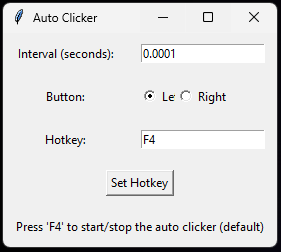
Configure repeated desktop mouse clicks without manually repeating each click. The Python application provides interval, left/right button, and start/stop hotkey controls in a small Tkinter window.
Key features
- Configure the interval between clicks.
- Choose the mouse button to use.
- Choose a start/stop hotkey; F4 is the default.
- Run clicking on a separate thread so the interface remains responsive.
How it works
Tkinter handles the configuration window, PyAutoGUI generates clicks, and keyboard registers the global hotkey. A worker thread runs the click loop while a threading.Event signals it to stop.
How to use
- Open View Source to inspect auto_clicker.py and its imports.
- In the desktop application, set an interval in seconds, choose Left or Right, and use F4 or the configured hotkey to toggle clicking.
Project notes
This is desktop software, not an application that runs inside this website.
The source repository is available. No separate executable download is advertised here.
The public Python source was inspected for these controls and dependencies. Desktop execution and operating-system compatibility were not tested in this review.